Make Your Own Title Strips
So you've just spent your life savings on that 60-year-old jukebox which has been totally rebuilt, re-chromed, and restored. You bought a set of pre-printed title strips from the seller. Then you get your felt tip pen and write in the record titles. Place 'em in your juke and ...... hmmm! It's ruined the authenticity of the whole unit and you wonder what can you do to put it right
If you have access to a spreadsheet or desktop publishing tool (or similar) then you can make your own title strips!

Probably the easiest tool to use for performing this task is any spreadsheet program. The advantage with using a spreadsheet is that once the initial design has been completed, the 'cell' structure enables easy editing of text and alignment for future strips.
The down side of using a spreadsheet is that if you really want to go to town on the design of the strip, e.g. fancy frames and colours, then you are fairly limited in what you can do. Not unreasonable I suppose given that spreadsheets were designed as accounting tools!
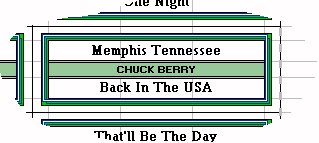
Here's an example of a title strip created with Microsoft Excel:
 For the more adventurous, a desktop publishing tool might be more appropriate. These are typically equipped with complex design features which can enable a wide variety of designs to be produced.
The problem with DTP tools is that, not having a cell structure like a spreadsheet, alignment and sizing of text can be a tortuous exercise when dealing with small precision tasks - like making jukebox title strips!
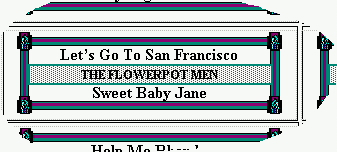
I created the following example with Microsoft Publisher.
 When printing your strips, remember that you will need some card which is thick enough to fit snugly into the strip holders, and thin enough to go through your printer. I use 200 micron A4 paper.
If all of the above is too much for you and you can't be bothered with designing your own strips, there are some commercially available PC programs which will make it much easier for you.
I can highly recommend the "Jukebox" title strip utility which you can try / buy at the Low Profile site. I've used this product since 1999, and it's backed by an excellent advice and support service too.